
Organizing Website Content: An Easy to Understand Guide For Beginners

Planning and organizing website content can feel overwhelming, especially when you have a large amount of it. I’m going to show you how to tackle this in a way that already makes sense to you.
Your website navigation is like a restaurant menu
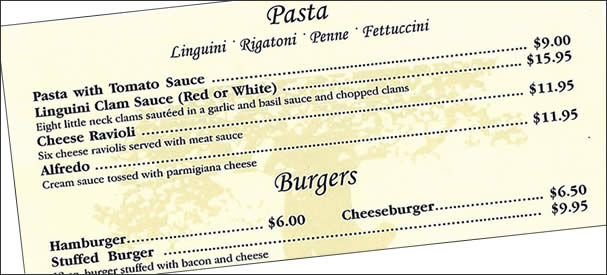
Organize your website content into logical categories like a restaurant menu. Most menus are usually divided into categories and subcategories. Pastas go with the pasta, and burgers go with burgers, etc. Very sensible, right?
Here’s the right way to do it…
Suppose you were a landscaper offering different landscaping services like “landscape lighting,” “landscape design,” etc.. In that case, you’d want all those services under one category on one tab of your main menu, just like the example below. This means you definitely want each service to have its own page.
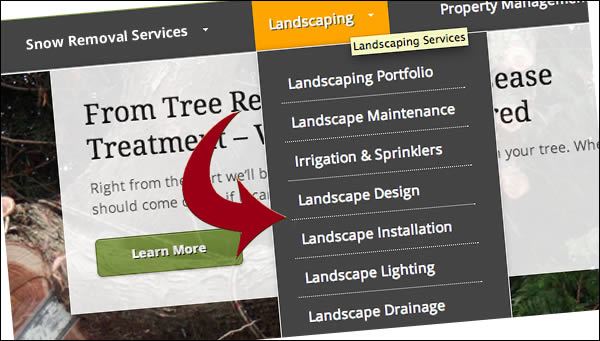
The right way: With individual pages for each service in the dropdown.
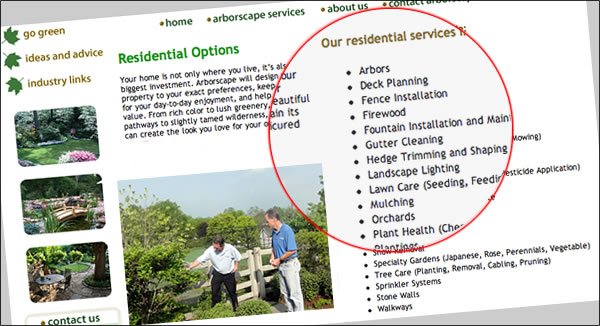
Here’s the wrong way to organize content.
Listing all of your services on one page instead of individual landing pages is a beginner’s mistake. From a search engine optimization perspective, it can be a costly business mistake.
The main menu should clearly tell the story

Your main menu should tell your visitors exactly what they are going to get at a glance. Creatively conveying this message in your menu bar is great if you can do it in a way that doesn’t make the visitor have to guess where the links will take them.
The 3 most common pages on any website
We already know what 3 of the pages on your site will probably be. Let’s define them.
1. Home Page: This may be the first page on a website that a visitor sees (but not always the case.) At a glance, your home page should identify your website’s main offer, as in “what you do,” “who you do it for,” and “why you’re different.”
Tip: As shown in the Landscape example above, a descriptive “tagline” (also called a strapline) near your company name or logo can be very helpful in describing what you do at a glance.
2. About Page: This can be a popular page on one’s site. This page usually includes some background info.
It’s also a great opportunity to post a picture of yourself or your team.
Show some personality with your About page. Tell your story and make it fun…

Personally, I have never been a big fan of formal “bios,” but they do have their place. The about page is your best opportunity to take some creative license and show that you’re human. Your visitors will connect with real faces and authentic copy.
Tip: While writing about yourself, creatively tie in benefits for your prospect, and your “about” page becomes that much more engaging. See this great “about page” article on Copyblogger that touches on the idea of not making your about page all about you.
3. Contact Page: This is an easy one. Here’s where you put your contact info, a contact form, and possibly a link for driving directions if applicable. Testimonials can go here as well, and don’t forget a link to your “Google My Business” listing and social media profiles.
How many pages do I need on my website?
The short answer is every service you provide needs its own landing page. As discussed above, lumping all of your services on one page is a missed opportunity for your business, and here’s why…
Why multiple landing pages are the key
Back to the restaurant concept. Not all of your visitors will enter through the front door of your restaurant (your home page). A well-optimized site funnels traffic through multiple entry points (landing pages).
You can create many different pages for visitors to land on via search engines. If you offer many different types of services, having a page for each of those services provides multiple entry points into your website.
If you can solve different types of problems for people, then you need different pages explaining how your product or service can solve a particular problem. Again, this touches on more advanced concepts in content marketing and search engine optimization.
Even if you’re a beginner and have no clue about “landing pages,” or you’re just working on assembling content to send to your web designer, take my advice and break your services into individual dedicated pages. It will definitely pay off.
Are blog posts considered “landing pages”?
Most people think of a landing page as a service page or a page with a special offer, but those are only two types of landing pages.
A landing page is any page on your site that visitors will land on when they enter your website. So, that means that a home page could be considered a landing page. A product page could also qualify and yes, a blog post could also definitely be considered a landing page.
Blog articles can indeed serve as excellent landing pages, and they should. This article is a perfect example. You landed here. Maybe you will leave after you’ve got what you need? Maybe you’ll contact me if you need more help?
Or maybe you’ll want to learn how to come up with great blog post ideas to use your blog to attract more visitors and grow your business.
Do you know your target audience?
A solid understanding of your target audience and their needs can help you decide what type of content to include on your website.
These questions can serve as inspiration for developing your content:
- Who are you building this website for?
- What are your visitors’ needs?
- What are their pain points?
- How can you resolve their doubts and concerns?
- Will your website be able to easily fulfill your visitors’ needs?
- Are you answering their basic questions?
- Are you speaking to them using language they can understand (their language.)
- How will you substantiate your claims? E.g., testimonials, social proof, etc.
- Are you guiding your visitors to do something on your site, like take the next step?
- Is there a “call to action?” E.g., sign up for a newsletter, make a purchase, submit a contact form, visit the next page, etc.
Let’s recap
How the content of a website is organized should be dictated by the categories or services you are offering. If you gave some of the preceding questions some thought, you probably have some content ideas. Your main services or offerings will serve as your primary categories.
For example, a health club website might use “Fitness Classes” as a primary category on the navbar. Using a drop-down menu under the category of “Fitness Classes,” they might list other pages like “Yoga Classes,” “Aerobics Classes, ” “Spinning Classes,” etc.
Remember, creating separate pages for each service is in your best interest. Using the preceding example means each type of fitness class should have its own landing page.
Following some of the advice outlined in this guide should help streamline your website planning process.
If you would like to leave a comment below, I’d love to hear from you. Or contact me directly if you’re interested in working with me.

Have a Question?

If you have a question, leave a comment below or email us. We'll get back to you.